Multisig setups
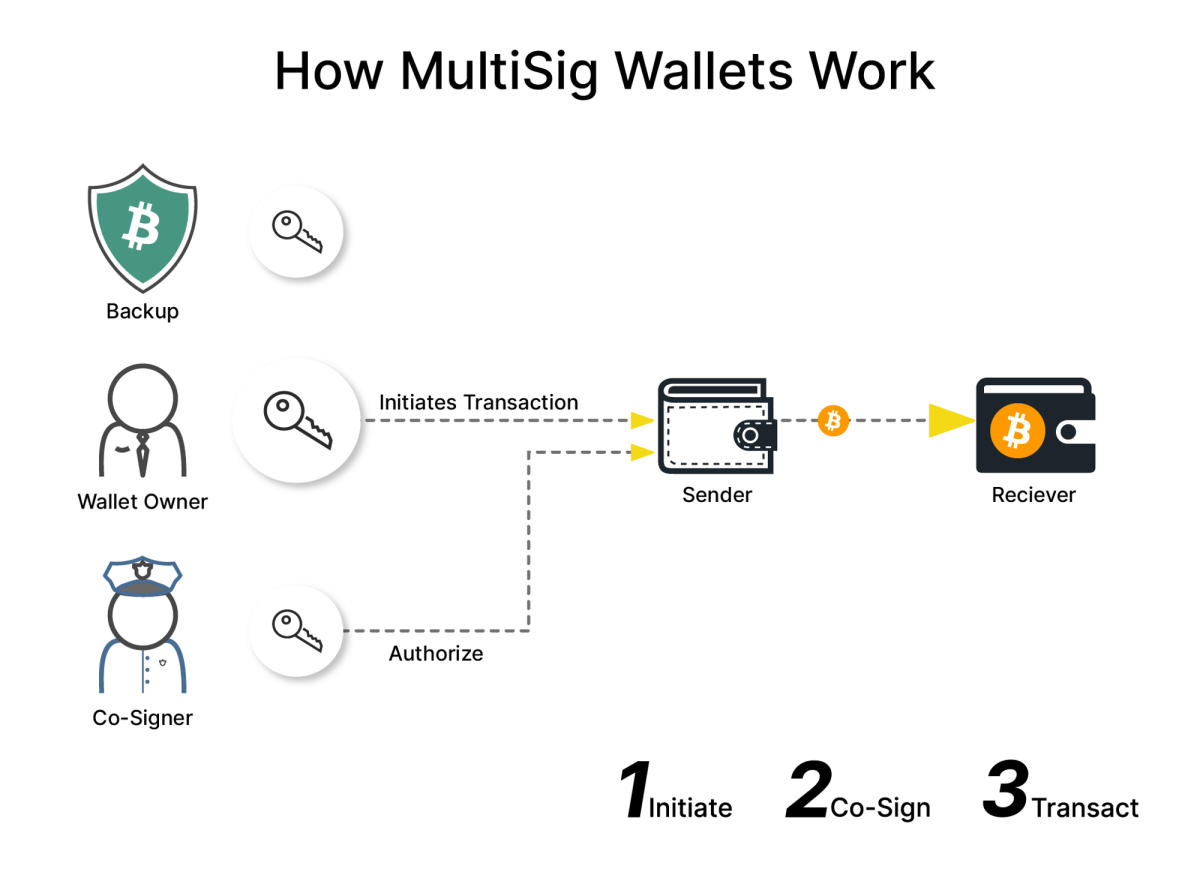
Testing 2-of-3 multisig is a great way to learn before committing real funds.
Option 1 (recommended): Sparrow as coordinator, Trezor + phone + desktop as keys
Sparrow Wallet runs natively on both Linux Mint and macOS and is the most mature multisig coordinator available.
| Keystore | Device | Notes |
|---|---|---|
| Key 1 | Trezor | Connect via USB to Sparrow on Linux or macOS |
| Key 2 | Electrum or BlueWallet on GrapheneOS | Hot wallet in its own dedicated profile |
| Key 3 | Sparrow software wallet on the other computer | e.g. created on the Mac while the Trezor signs on Mint |
Pros
- Excellent multisig UX: descriptor import/export, PSBT signing via QR code, file, or USB
- Works identically on Linux Mint and macOS, so you can test both
- GrapheneOS profiles give you real isolation — put the signer wallet in a profile with no other apps and no network access to anything else
- Free, open source, connects to public Electrum servers for testing or your own Bitcoin Core for privacy
Cons
- Sparrow's software keystores are hot keys — fine for testing, but treat any mainnet amount as spendable by malware on that machine
- Moving PSBTs to the phone can be clunky (QR scanning between phone and laptop screen works, but it's a manual ritual)
- Sparrow is a desktop app; there's no phone-side coordinator
Option 2: Electrum-only multisig (desktop + Android)
Run Electrum on Linux Mint or macOS, and Electrum for Android on GrapheneOS. Build a 2-of-3 with: Trezor keystore, desktop Electrum seed, phone Electrum seed.
Pros
- One ecosystem and one wallet format everywhere; xpub exchange is trivial
- Electrum Android supports multisig and runs fine on GrapheneOS
- Lightweight; can use Tor and your own Electrum server
Cons
- Electrum's multisig and PSBT flows feel dated compared to Sparrow
- You're trusting hot seeds in Electrum on two internet-connected devices if you don't use the Trezor quirk carefully
- Mobile PSBT exchange is file-share based rather than QR-native, which is more error-prone when learning
Option 3: Nunchuk (mobile-first)
Nunchuk on GrapheneOS as the coordinator and one signer, Nunchuk desktop on Linux/macOS as a second signer, and your Trezor as the third (verify current Trezor compatibility for your model/firmware before relying on it).
Pros
- Best mobile multisig experience; excellent descriptor/backup handling
- Assisted-key options and clear recovery documentation — genuinely good for beginners
- Desktop app available for both your platforms
Cons
- Some features nudge you toward their subscription/assisted backups; you must consciously stay self-custodial
- Hardware wallet support is narrower and changes between versions — confirm Trezor works with your exact setup first
- Newer project than Electrum/Sparrow, so less battle-tested
Option 4 (later upgrade): add an airgapped QR hardware signer
Once you've validated the workflow, replace one hot key with a Keystone, Jade, or Passport that signs via animated QR codes with no USB or network at all.
Pros
- Eliminates the "hot key on a general-purpose computer" weakness entirely
- QR-based PSBT flow with Sparrow is smooth and fully airgapped
Cons
- Costs money for hardware you don't yet own
- Overkill for a learning phase with test coins
Suggested test plan
- Start on testnet or signet in Sparrow — create the 2-of-3, receive, send, and sign with every possible pair of keys (Trezor+phone, Trezor+desktop, phone+desktop).
- Practice the backup ritual: export the wallet descriptor/output descriptor and store it with each seed. In multisig, seeds alone are not enough — if you lose the descriptor, you may lose the funds even holding 2 seeds.
- Do a recovery drill: delete the wallet from Sparrow and rebuild it from the descriptor plus two seeds on a fresh machine.
- Graduate to mainnet with a small amount you can afford to lose, and repeat a full spend.
- Only then consider sizing up or adding an airgapped signer.
Gotchas worth writing down
- Never reuse the same seed for two keystores; use three independently generated seeds (this is why Cake Wallet can't just "be a key" anyway).
- Keep written notes of which device holds which key and which derivation paths were used.
- GrapheneOS profiles can be deleted with a long-press — the seed backup matters more than the profile, but don't accidentally wipe a key you haven't backed up elsewhere.
- For privacy during testing, public Electrum servers are fine; for real funds, point Sparrow at your own Bitcoin Core node.
If you want the shortest path to learning: install Sparrow on Linux Mint, build the 2-of-3 with your Trezor plus an Electrum signer on the GrapheneOS profile and a Sparrow software keystore on the Mac, and run the whole cycle on signet first.
Inheritance patterns with 3-of-5
There are two classic key distributions, with opposite trust assumptions:
| Key | Sovereign majority | Family council | |||||||||||||||||||||||||||||||||||||||||||||||||||||||||||||||||||||||||||||||||||||||||||||||||||||||||||||||||||||||||||||||||||||||||||||||||||||||||||||||||||||||||||||||||||||||||||||||||||||||||||||||||||||||||||||||||||||||||||||||||||||||||||||||||||||||||||||||||||||||||||||||||||||||||||||||||||||||||||||||||||||||||||||||||||||||||||||||||||||||||||||||||||||||||||||||||||||||||||||||||||||||||||||||||||||||||||||||||||||||||||||||||||||||||||||||||||||||||||||||||||||||||||||||||||||||||||||||||||||||||||||||||||||||||||||||||||||||||||||||||||||||||||||||||||||||||||||||||||||||||||||||||||||||||||||||||||||||||||||||||||||||||||||||||||||||||||||||||||||||||||||||||||||||||||||||||||||||||||||||||||||||||||||||||||||||||||||||||||||||||||||||||||||||||||||||||||||||||||||||||||||||||||||||||||||||||||||||||||||||||||||||||||||||||||||||||||||||||||||||||||||||||||||||||||||||||||||||||||||||||||||||||||||||||||||||||||||||||||||||||||||||||||||||||||||||||||||||||||||
|---|---|---|---|---|---|---|---|---|---|---|---|---|---|---|---|---|---|---|---|---|---|---|---|---|---|---|---|---|---|---|---|---|---|---|---|---|---|---|---|---|---|---|---|---|---|---|---|---|---|---|---|---|---|---|---|---|---|---|---|---|---|---|---|---|---|---|---|---|---|---|---|---|---|---|---|---|---|---|---|---|---|---|---|---|---|---|---|---|---|---|---|---|---|---|---|---|---|---|---|---|---|---|---|---|---|---|---|---|---|---|---|---|---|---|---|---|---|---|---|---|---|---|---|---|---|---|---|---|---|---|---|---|---|---|---|---|---|---|---|---|---|---|---|---|---|---|---|---|---|---|---|---|---|---|---|---|---|---|---|---|---|---|---|---|---|---|---|---|---|---|---|---|---|---|---|---|---|---|---|---|---|---|---|---|---|---|---|---|---|---|---|---|---|---|---|---|---|---|---|---|---|---|---|---|---|---|---|---|---|---|---|---|---|---|---|---|---|---|---|---|---|---|---|---|---|---|---|---|---|---|---|---|---|---|---|---|---|---|---|---|---|---|---|---|---|---|---|---|---|---|---|---|---|---|---|---|---|---|---|---|---|---|---|---|---|---|---|---|---|---|---|---|---|---|---|---|---|---|---|---|---|---|---|---|---|---|---|---|---|---|---|---|---|---|---|---|---|---|---|---|---|---|---|---|---|---|---|---|---|---|---|---|---|---|---|---|---|---|---|---|---|---|---|---|---|---|---|---|---|---|---|---|---|---|---|---|---|---|---|---|---|---|---|---|---|---|---|---|---|---|---|---|---|---|---|---|---|---|---|---|---|---|---|---|---|---|---|---|---|---|---|---|---|---|---|---|---|---|---|---|---|---|---|---|---|---|---|---|---|---|---|---|---|---|---|---|---|---|---|---|---|---|---|---|---|---|---|---|---|---|---|---|---|---|---|---|---|---|---|---|---|---|---|---|---|---|---|---|---|---|---|---|---|---|---|---|---|---|---|---|---|---|---|---|---|---|---|---|---|---|---|---|---|---|---|---|---|---|---|---|---|---|---|---|---|---|---|---|---|---|---|---|---|---|---|---|---|---|---|---|---|---|---|---|---|---|---|---|---|---|---|---|---|---|---|---|---|---|---|---|---|---|---|---|---|---|---|---|---|---|---|---|---|---|---|---|---|---|---|---|---|---|---|---|---|---|---|---|---|---|---|---|---|---|---|---|---|---|---|---|---|---|---|---|---|---|---|---|---|---|---|---|---|---|---|---|---|---|---|---|---|---|---|---|---|---|---|---|---|---|---|---|---|---|---|---|---|---|---|---|---|---|---|---|---|---|---|---|---|---|---|---|---|---|---|---|---|---|---|---|---|---|---|---|---|---|---|---|---|---|---|---|---|---|---|---|---|---|---|---|---|---|---|---|---|---|---|---|---|---|---|---|---|---|---|---|---|---|---|---|---|---|---|---|---|---|---|---|---|---|---|---|---|---|---|---|---|---|---|---|---|---|---|---|---|---|---|---|---|---|---|---|---|---|---|---|---|---|---|---|---|---|---|---|---|---|---|---|---|---|---|---|---|---|---|---|---|---|---|---|---|---|---|---|---|---|---|---|---|---|---|---|---|---|---|---|---|---|---|---|---|---|---|---|---|---|---|---|---|---|---|---|---|---|---|---|---|---|---|---|---|---|---|---|---|---|---|---|---|---|---|---|---|---|---|---|---|---|---|---|---|---|---|---|---|---|---|---|---|---|---|---|---|---|---|---|---|---|---|---|---|---|---|---|---|---|---|---|---|---|---|---|---|---|---|---|---|---|---|---|---|---|---|---|---|---|---|---|---|---|---|---|---|---|---|---|---|---|---|---|---|---|---|---|---|---|---|---|---|---|---|---|---|---|---|---|---|---|---|---|---|---|---|---|---|---|---|---|---|---|---|---|---|---|---|---|---|---|---|---|---|---|---|---|---|---|---|---|---|---|---|---|---|---|---|---|---|---|---|---|---|---|---|---|---|---|---|---|---|---|---|---|---|---|---|---|---|---|---|---|---|---|---|---|---|---|---|---|---|---|---|---|---|---|---|---|---|---|---|---|---|---|---|---|---|---|---|---|---|---|---|---|---|---|---|---|---|---|---|---|---|---|---|---|---|---|---|---|---|---|---|---|---|---|---|---|---|---|---|---|---|---|---|---|---|---|---|---|---|---|---|---|---|---|---|---|---|---|---|---|---|---|---|---|---|---|---|---|---|---|---|---|---|---|---|---|---|---|---|
| 1 | You, home safe | You, home safe | |||||||||||||||||||||||||||||||||||||||||||||||||||||||||||||||||||||||||||||||||||||||||||||||||||||||||||||||||||||||||||||||||||||||||||||||||||||||||||||||||||||||||||||||||||||||||||||||||||||||||||||||||||||||||||||||||||||||||||||||||||||||||||||||||||||||||||||||||||||||||||||||||||||||||||||||||||||||||||||||||||||||||||||||||||||||||||||||||||||||||||||||||||||||||||||||||||||||||||||||||||||||||||||||||||||||||||||||||||||||||||||||||||||||||||||||||||||||||||||||||||||||||||||||||||||||||||||||||||||||||||||||||||||||||||||||||||||||||||||||||||||||||||||||||||||||||||||||||||||||||||||||||||||||||||||||||||||||||||||||||||||||||||||||||||||||||||||||||||||||||||||||||||||||||||||||||||||||||||||||||||||||||||||||||||||||||||||||||||||||||||||||||||||||||||||||||||||||||||||||||||||||||||||||||||||||||||||||||||||||||||||||||||||||||||||||||||||||||||||||||||||||||||||||||||||||||||||||||||||||||||||||||||||||||||||||||||||||||||||||||||||||||||||||||||||||||||||||||||||
| 2 | You, bank box | You, office/bank box | |||||||||||||||||||||||||||||||||||||||||||||||||||||||||||||||||||||||||||||||||||||||||||||||||||||||||||||||||||||||||||||||||||||||||||||||||||||||||||||||||||||||||||||||||||||||||||||||||||||||||||||||||||||||||||||||||||||||||||||||||||||||||||||||||||||||||||||||||||||||||||||||||||||||||||||||||||||||||||||||||||||||||||||||||||||||||||||||||||||||||||||||||||||||||||||||||||||||||||||||||||||||||||||||||||||||||||||||||||||||||||||||||||||||||||||||||||||||||||||||||||||||||||||||||||||||||||||||||||||||||||||||||||||||||||||||||||||||||||||||||||||||||||||||||||||||||||||||||||||||||||||||||||||||||||||||||||||||||||||||||||||||||||||||||||||||||||||||||||||||||||||||||||||||||||||||||||||||||||||||||||||||||||||||||||||||||||||||||||||||||||||||||||||||||||||||||||||||||||||||||||||||||||||||||||||||||||||||||||||||||||||||||||||||||||||||||||||||||||||||||||||||||||||||||||||||||||||||||||||||||||||||||||||||||||||||||||||||||||||||||||||||||||||||||||||||||||||||||||||
| 3 | You, distant relative | Spouse | |||||||||||||||||||||||||||||||||||||||||||||||||||||||||||||||||||||||||||||||||||||||||||||||||||||||||||||||||||||||||||||||||||||||||||||||||||||||||||||||||||||||||||||||||||||||||||||||||||||||||||||||||||||||||||||||||||||||||||||||||||||||||||||||||||||||||||||||||||||||||||||||||||||||||||||||||||||||||||||||||||||||||||||||||||||||||||||||||||||||||||||||||||||||||||||||||||||||||||||||||||||||||||||||||||||||||||||||||||||||||||||||||||||||||||||||||||||||||||||||||||||||||||||||||||||||||||||||||||||||||||||||||||||||||||||||||||||||||||||||||||||||||||||||||||||||||||||||||||||||||||||||||||||||||||||||||||||||||||||||||||||||||||||||||||||||||||||||||||||||||||||||||||||||||||||||||||||||||||||||||||||||||||||||||||||||||||||||||||||||||||||||||||||||||||||||||||||||||||||||||||||||||||||||||||||||||||||||||||||||||||||||||||||||||||||||||||||||||||||||||||||||||||||||||||||||||||||||||||||||||||||||||||||||||||||||||||||||||||||||||||||||||||||||||||||||||||||||||||||
| 4 | Heir | Heir | |||||||||||||||||||||||||||||||||||||||||||||||||||||||||||||||||||||||||||||||||||||||||||||||||||||||||||||||||||||||||||||||||||||||||||||||||||||||||||||||||||||||||||||||||||||||||||||||||||||||||||||||||||||||||||||||||||||||||||||||||||||||||||||||||||||||||||||||||||||||||||||||||||||||||||||||||||||||||||||||||||||||||||||||||||||||||||||||||||||||||||||||||||||||||||||||||||||||||||||||||||||||||||||||||||||||||||||||||||||||||||||||||||||||||||||||||||||||||||||||||||||||||||||||||||||||||||||||||||||||||||||||||||||||||||||||||||||||||||||||||||||||||||||||||||||||||||||||||||||||||||||||||||||||||||||||||||||||||||||||||||||||||||||||||||||||||||||||||||||||||||||||||||||||||||||||||||||||||||||||||||||||||||||||||||||||||||||||||||||||||||||||||||||||||||||||||||||||||||||||||||||||||||||||||||||||||||||||||||||||||||||||||||||||||||||||||||||||||||||||||||||||||||||||||||||||||||||||||||||||||||||||||||||||||||||||||||||||||||||||||||||||||||||||||||||||||||||||||||||
| 5 | Lawyer/executor | Lawyer or neutral family friend | |||||||||||||||||||||||||||||||||||||||||||||||||||||||||||||||||||||||||||||||||||||||||||||||||||||||||||||||||||||||||||||||||||||||||||||||||||||||||||||||||||||||||||||||||||||||||||||||||||||||||||||||||||||||||||||||||||||||||||||||||||||||||||||||||||||||||||||||||||||||||||||||||||||||||||||||||||||||||||||||||||||||||||||||||||||||||||||||||||||||||||||||||||||||||||||||||||||||||||||||||||||||||||||||||||||||||||||||||||||||||||||||||||||||||||||||||||||||||||||||||||||||||||||||||||||||||||||||||||||||||||||||||||||||||||||||||||||||||||||||||||||||||||||||||||||||||||||||||||||||||||||||||||||||||||||||||||||||||||||||||||||||||||||||||||||||||||||||||||||||||||||||||||||||||||||||||||||||||||||||||||||||||||||||||||||||||||||||||||||||||||||||||||||||||||||||||||||||||||||||||||||||||||||||||||||||||||||||||||||||||||||||||||||||||||||||||||||||||||||||||||||||||||||||||||||||||||||||||||||||||||||||||||||||||||||||||||||||||||||||||||||||||||||||||||||||||||||||||||||
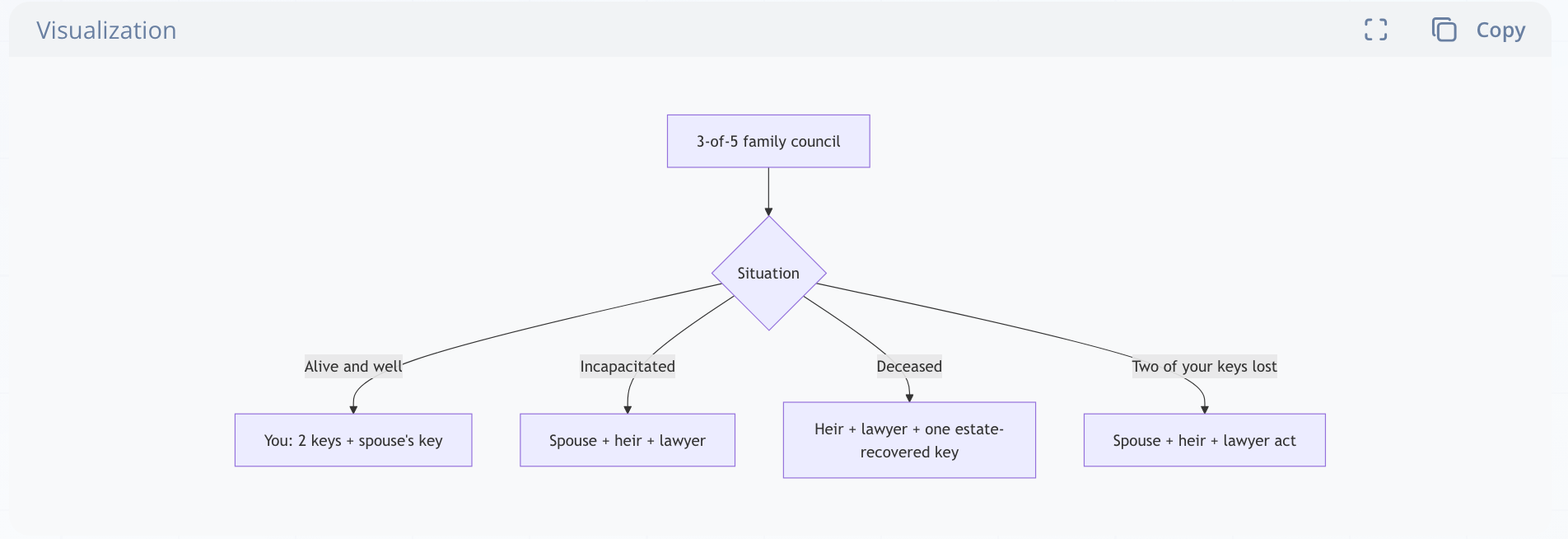
- Sovereign majority (you hold 3): nobody but you can spend while you live; no coalition of heirs can act over your objection. On death, heirs need estate access to just one of your keys, plus heir + lawyer. Con: your own spends need three devices.
- Family council (you hold 2): spouse + heir + lawyer can spend if you're incapacitated — which wills do not solve — but that same trio can also spend next Tuesday. This is a trust decision, not a technical one.
The pattern pure multisig can't do: timelocks
Plain k-of-n keys are always valid; conditional access — "heir keys only become usable after 6 months of inactivity" — needs script-level timelocks. That's exactly the inheritance/dead-man's-switch use case, and it's worth looking at Liana(Wizardsardine), a wallet purpose-built around timelocked recovery paths: spend with your normal quorum, and if the wallet goes quiet for a set period, a recovery key (or an heir's quorum) unlocks. Compared to 3-of-5:
- Pro: heirs get standing access only after inactivity, solving incapacity and death without giving them a live quorum; simpler for non-technical heirs
- Con: younger tooling, fewer hardware wallet integrations, and a timelock means recovery is delayed, not instant
Collaborative-custody firms (e.g., Casa; Nunchuk's assisted-key option) occupy a middle ground: they hold one key, you hold the rest, and they provide inheritance documentation and support, for a subscription and some trust/KYC.
Gotchas specific to larger quorums
- Vendor diversity. Don't buy five identical devices from one batch; a firmware bug or vendor shutdown shouldn't be able to brick all keystores at once. Mix Trezor, Jade, Keystone, BitBox, etc. A keystore can even be an offline-generated BIP39 seed on steel whose xpub you exported once at setup — no device needed until recovery.
- Bank boxes get sealed at death in many jurisdictions. Never make a box the sole location of a required key or the only descriptor copy.
- Rehearse annually with your heirs. A printed runbook (descriptor, device list, locations, step-by-step screenshots) stored with the will beats any clever key scheme nobody can operate.
- Fees and PSBT logistics with several humans: pass the PSBT file or QR around; every co-signer needs the wallet or descriptor loaded. Practice on signet with software keystores first — free, and identical mechanics.
- FROST/threshold-Schnorr (taproot) will eventually make a 3-of-5 look like a single key on-chain (~58 vB, private, no script exposure), but tooling is still young and not something to bet an inheritance on today.
Rule-of-thumb ladder
- Moderate savings: 2-of-3, or singlesig + Liana timelock if inheritance is the main worry.
- Larger estates with multiple heirs: 3-of-5 sovereign majority, runbook, annual drill.
- Organizations or family offices: 3-of-5 or 4-of-6.
- 5-of-7: boards and treasuries spanning jurisdictions with multiple custodians — rarely worth it for an individual, and never fun to spend from.
IF you already have the signet workflow from before: build a throwaway 3-of-5 with software keystores in Sparrow, practice all three scenarios (alive, degraded, "heir recovery" by deleting your keystores and rebuilding from descriptor + seeds), and you'll know exactly which real-world arrangement your family could actually operate.